


TOP-5 best 13-inch laptops of 2026 – which one to buy right now?
December 11, 2025
Choosing a 13-inch laptop is like picking the perfect thermos: you want it compact, able to hold heat (i.e. battery) all day, and never leak. Stores are full of options, but in real life what matters isn’t the flashy color — it’s being able to run Notion, Discord, and a couple of PDFs without lag, fit in your bag, and not drain the battery like crazy. In 2026 ultrabooks have evolved: AI chips, insane contrast screens, more RAM — yet the choice is still confusing.
We dug through the JustBuy catalog and picked five models under 100,000 UAH that will save you during a typical work marathon: from morning in the office to late-night coding. Not for 4K rendering or mining, but for pure mobility and everyday tasks.
Here’s how they behave in daily chaos and deadlines, who they’re best for, and who should look at something simpler.
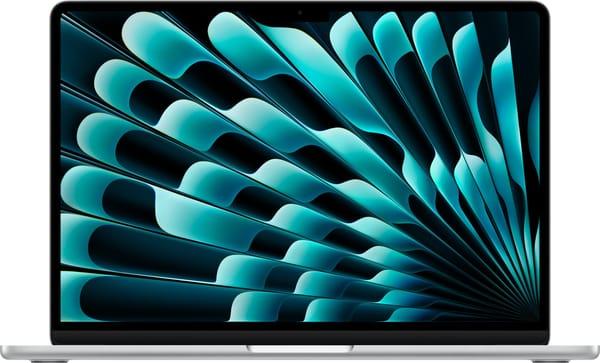
1. Apple MacBook Air 13” M4
The MacBook Air 13" with the M4 chip remains the gold standard for those who want maximum performance at minimum weight. It’s built for daily tasks, studying, and creative work when you need to switch tabs instantly, work in the cloud, or edit short videos on the go. The M4 chip handles heavy projects with ease while staying cool and completely silent thanks to passive cooling. 24 GB of RAM gives you peace of mind for years to come, and the Liquid Retina display makes text and content incredibly eye-friendly.
Another huge plus is battery life. The claimed 18 hours feels like a full workday + evening without charging. At just 1.24 kg, it slips easily into any bag, and the 12 MP webcam with Center Stage is perfect for online classes or work calls. If you want a laptop that requires zero compromises and fits perfectly into the Apple ecosystem, this Air is the best compact option.
Best for:
people deep in the Apple ecosystem who sync everything with their iPhone;
creative students who edit videos in Final Cut on the go;
those who hate outlets and work in cafés or trains.
Specifications:
Processor: Apple M4
GPU: 10-core
RAM: 24 GB
Storage: 512 GB SSD
Display: Retina 2560×1664, 60 Hz, True Tone
Battery: 53.8 Wh
Ports: 2× Thunderbolt 4, MagSafe 3, headphone jack
Weight: 1.24 kg
Features: Touch ID, passive cooling, backlit keyboard

2. Dell XPS 13 9340
The Dell XPS 13 9340 feels like a gadget from the future. Bezel-less display, premium aluminum, ultra-thin profile, and powerful Intel Core Ultra 7 internals create a machine that handles work projects, studying, and light editing effortlessly. Thanks to smart power management, it stays quiet and stable even under heavy multitasking. The 120 Hz screen adds smoothness and is perfect for design tools or just comfortable scrolling.
14–16 hours of battery life makes the XPS a reliable travel companion. At only 1.19 kg and with 500 nits brightness, it’s easy to carry and readable outdoors. For those who value design, mobility, and modern performance, the XPS 13 is nearly perfect.
Best for:
those who love futuristic design;
IT and design professionals who use AI for code and sketches;
frequent travelers who need a bright screen in sunlight.
Specifications:
Processor: Intel Core Ultra 5 125H
GPU: Intel Arc Graphics
RAM: 16 GB DDR5
Storage: 512 GB SSD
Display: WVA 1920×1200, 120 Hz, matte
Battery: 55 Wh
Ports: 2× Thunderbolt 4
Weight: 1.19 kg
Features: Wi-Fi 7, Intel AI Boost NPU, backlit keyboard
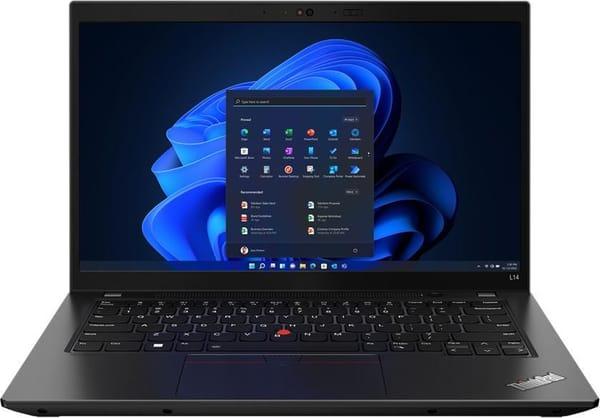
3. Lenovo ThinkPad L14 Gen 3
The Lenovo ThinkPad L14 Gen 3 is for those who value reliability above all. It doesn’t chase trends, but it gets the job done, lasts for years, and has one of the best keyboards on the market. The Intel Core i5-1235U handles studying, office apps, long documents, and a browser with dozens of tabs with ease. Expandable RAM up to 64 GB makes it a long-term investment that easily lasts 5–7 years.
Durable body, minimalist design, and 10–12 hours of battery life — enough for a full study day. If you live in a dorm, type a lot, or just want a laptop that won’t let you down when it matters most, ThinkPad is the “buy once and forget” option.
Best for:
keyboard enthusiasts and night-time writers;
students who want a laptop for 5+ years without upgrades;
dorm dwellers who value simplicity over flashy features.
Specifications:
Processor: Intel Core i5-1235U
GPU: Intel Iris Xe Graphics G7
RAM: 8 GB DDR4
Storage: 256 GB SSD
Display: IPS 1920×1080, matte
Ports: USB-A, USB-C, Ethernet, headphone jack
Weight: 1.39 kg
Features: backlit keyboard, fingerprint reader, RAM expandable to 64 GB
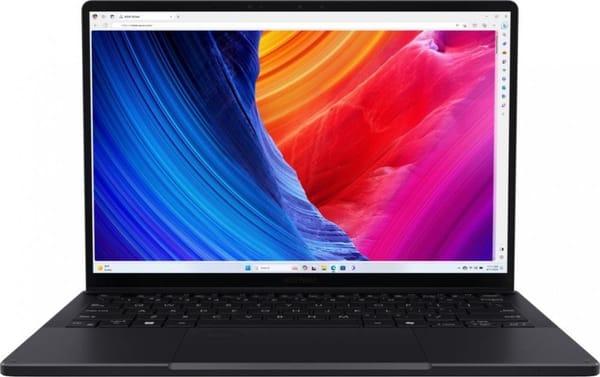
4. ASUS ProArt PX13 OLED
The ASUS ProArt PX13 OLED is a portable workstation for creative students and anyone combining studies with content creation. The Ryzen AI 9 HX 370 paired with an RTX 4070 renders video, handles 3D, runs neural networks, and tackles heavy tasks without breaking a sweat. The OLED panel delivers perfect color accuracy — crucial for photographers and videographers. 32 GB RAM + 2 TB SSD give plenty of room for large projects and archives.
Despite the power, it stays portable: 1.38 kg and up to 12 hours of battery life. Touchscreen + included stylus make it great for drawing, design, and notes. The ProArt PX13 is the ideal all-in-one tool for learning and creativity with zero compromises.
Best for:
media and graphics people who render in Premiere during lectures;
those who want an OLED screen for photo/video work;
anyone seeking the perfect balance of power and portability.
Specifications:
Processor: AMD Ryzen AI 9 HX 370
GPU: NVIDIA GeForce RTX 4070
RAM: 32 GB LPDDR5X
Storage: 2 TB SSD
Display: OLED 2880×1800, 60 Hz, 500 nits, 100% DCI-P3, PANTONE Validated
Battery: 73 Wh
Ports: USB-C (PD + DP), USB-A, HDMI 2.1, headphone jack
Weight: 1.38 kg
Features: MIL-STD-810H, backlit keyboard, XDNA 2 NPU
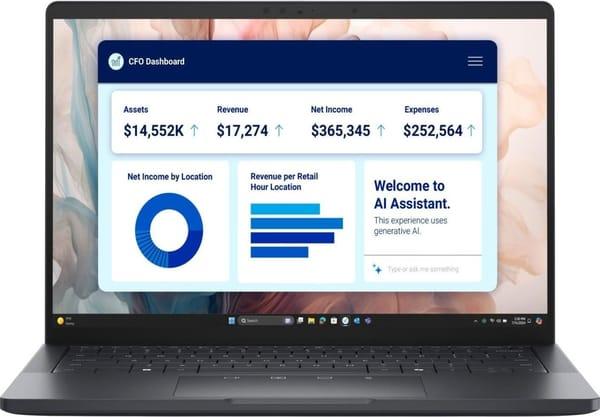
5. Dell Pro 13 Premium Touch
The Dell Pro 13 Premium Touch is for those who value neatness, mobility, and business-like style. The magnesium body is light, strong, and resistant to daily wear. Second-gen Intel Core Ultra processor delivers smooth office work, multitasking, and AI features like transcription or call optimization. The touchscreen is handy for quick notes, signing docs, or presentations right in class.
15-hour battery life makes it a reliable all-day companion. Spill-resistant keyboard is a lifesaver for students and café workers. It’s premium quality without paying for a loud brand name — perfect for documents, research, presentations, and anyone who appreciates convenience in every detail.
Best for:
people who spill coffee during lectures;
management or law professionals with tons of documents;
those who want premium feel without overpaying for the logo.
Specifications:
Processor: Intel Core Ultra 7 256V
GPU: Intel Arc Graphics 140V
RAM: 32 GB LPDDR5x
Storage: 512 GB SSD
Display: WVA 2560×1600, 60 Hz, 500 nits, Corning Gorilla Glass
Battery: 60 Wh
Ports: USB-C, Thunderbolt 4, USB-C with DisplayPort Alt Mode
Weight: 1.07 kg
Features: backlit keyboard, touchscreen, 100% sRGB
Conclusion
Honestly, there’s no single winner — some need a painter-level screen for design, some need a keyboard for essays, and some just don’t want to carry a brick. The good news: in 2026, for a reasonable price (up to ~$2,500 / 100k UAH), you can get an ultrabook that won’t let you down during exams or trips.
Tight budget? Start with the ThinkPad — cheap and bulletproof. For creativity and color — ProArt or XPS. Dreaming of Apple magic? The MacBook Air M4 will give you all-day battery and zero headaches. Choose based on your actual use case, not the cover. Then your laptop becomes an ally instead of a pre-exam stress source.
FAQ
Which of these 13-inch laptops actually lasts 15+ hours unplugged in 2026?
MacBook Air M4 takes the crown — 17–18 hours in mixed use (browser + office + Zoom + Spotify), confirmed by tests. Second place: Dell Pro 13 Premium Touch and XPS 13 — 14–16 hours. ProArt and ThinkPad are closer to 11–13 hours under real load.
Is it worth paying extra for OLED in the ASUS ProArt PX13 or is regular IPS enough?
If you work with photos, video, design, or just love rich colors — absolutely worth it. 3K OLED with 100% DCI-P3 and HDR delivers an image that regular IPS can’t touch. For documents and code — the extra cost isn’t justified; go XPS or Dell Pro.
Is 8 GB RAM in the ThinkPad L14 Gen 3 a death sentence in 2026?
No — just add a second 16–32 GB stick right away (costs ~$50–100). Slots are free, takes 10 minutes. Out of the box 8 GB is only enough for “browser + Word”; anything more will start lagging.
Which is fastest in everyday tasks: M4, Intel Core Ultra 2, or Ryzen AI 9 HX 370?
For typical speed (browser, office, light editing) — Apple M4 with 24 GB RAM is the snappiest; everything opens instantly. Ryzen AI 9 HX 370 + RTX 4070 (ProArt) is right behind and barely slower. Intel Core Ultra 7/Ultra 2 in XPS and Dell Pro feel a bit slower in native macOS apps, though in some Windows AI tools they can actually shine more. For 99% of users the difference is barely noticeable.
Which one is physically the toughest?
Classic winner — Lenovo ThinkPad L14 Gen 3 (military standard, spill-resistant keyboard, drop-tested). Second place: Dell Pro 13 with magnesium body and liquid protection. MacBook and XPS are premium aluminum but lack official military certification.